订单摘要项目
以下订单摘要项目过滤器是可用的:
cartItemClasscartItemPricecartItemScreenReaderPriceitemNamesubtotalPriceFormat
以下对象在过滤器之间共享:
- 购物车对象
- 购物车项目对象
以下截图显示了各个过滤器影响的部分:
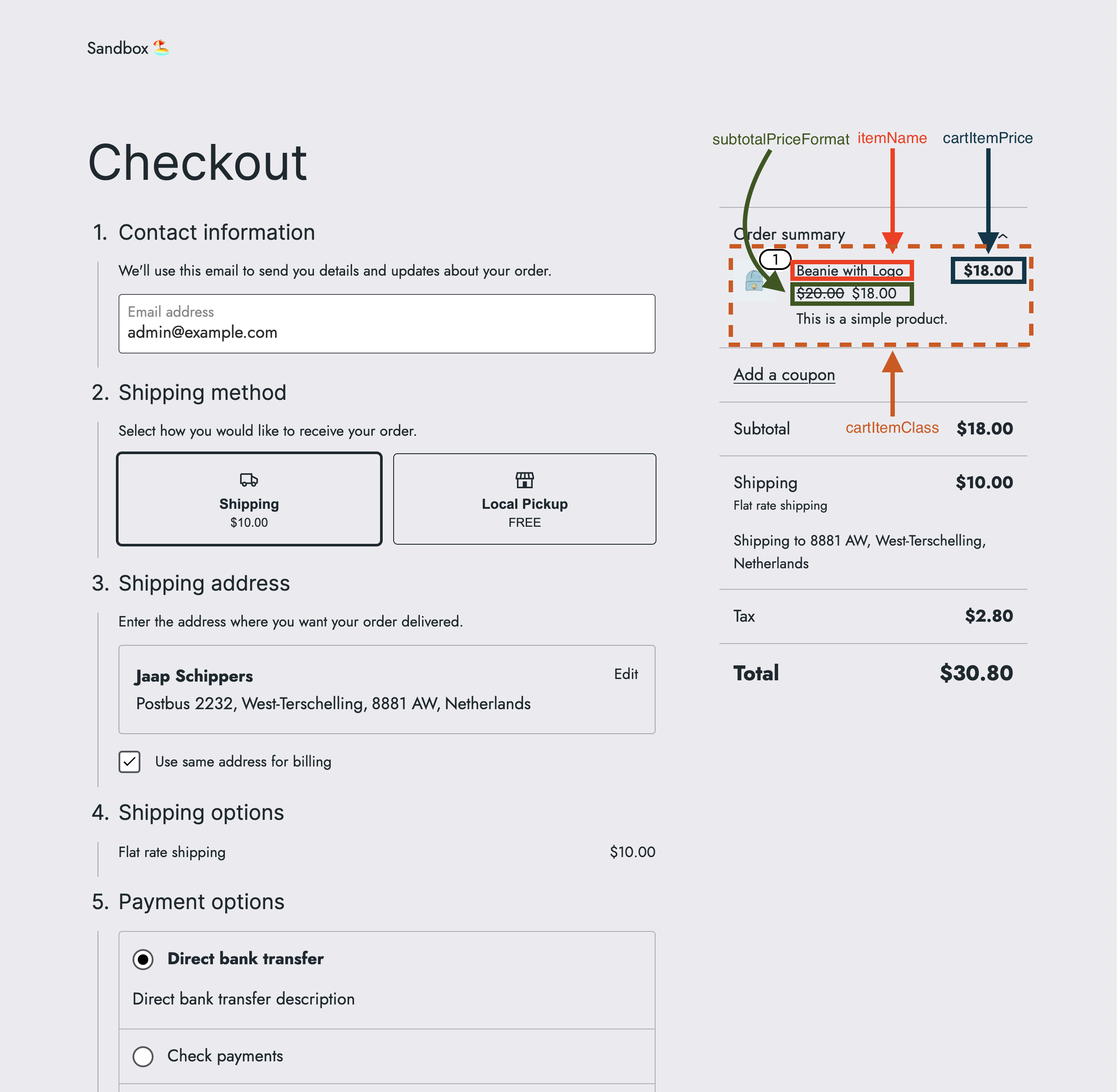
cartItemClass
描述
cartItemClass 过滤器允许修改订单摘要项目的类。
参数
- defaultValue
string(默认值:'') - 订单摘要项目的默认类。 - extensions
object(默认值:{}) - 扩展对象。 - args
object- 包含以下键的参数对象:
返回值
string- 修改后的订单摘要项目类,或一个空字符串。
代码示例
基本示例
const { registerCheckoutFilters } = window.wc.blocksCheckout;

const modifyCartItemClass = ( defaultValue, extensions, args ) => {
	const isOrderSummaryContext = args?.context === 'summary';

	if ( ! isOrderSummaryContext ) {
		return defaultValue;
	}

	return 'my-custom-class';
};

registerCheckoutFilters( 'example-extension', {
	cartItemClass: modifyCartItemClass,
} );
高级示例
const { registerCheckoutFilters } = window.wc.blocksCheckout;

const modifyCartItemClass = ( defaultValue, extensions, args ) => {
	const isOrderSummaryContext = args?.context === 'summary';

	if ( ! isOrderSummaryContext ) {
		return defaultValue;
	}

	if ( args?.cartItem?.name === 'Beanie with Logo' ) {
		return 'cool-class';
	}

	if ( args?.cartItem?.name === 'Sunglasses' ) {
		return 'hot-class';
	}

	return 'my-custom-class';
};

registerCheckoutFilters( 'example-extension', {
	cartItemClass: modifyCartItemClass,
} );
过滤器也可以组合使用。请参阅 组合过滤器 以获取示例。
截图
| 之前 | 之后 |
|---|---|
cartItemPrice
描述
cartItemPrice 过滤器允许修改订单摘要项的价格格式。
参数
- defaultValue
string(默认值:<price/>) - 订单摘要项的默认价格。 - extensions
object(默认值:{}) - 扩展对象。 - args
object- 参数对象,包含以下键: - validation
boolean- 检查返回值是否包含子字符串<price/>。
返回值
string- 修改后的订单摘要项价格格式,必须包含子字符串<price/>,或者原始的价格格式。
代码示例
基本示例
const { registerCheckoutFilters } = window.wc.blocksCheckout;

const modifyCartItemPrice = ( defaultValue, extensions, args, validation ) => {
	const isOrderSummaryContext = args?.context === 'summary';

	if ( ! isOrderSummaryContext ) {
		return defaultValue;
	}

	return '<price/> for all items';
};

registerCheckoutFilters( 'example-extension', {
	cartItemPrice: modifyCartItemPrice,
} );
高级示例
const { registerCheckoutFilters } = window.wc.blocksCheckout;

const modifyCartItemPrice = (defaultValue, extensions, args, validation) => {
	const isOrderSummaryContext = args?.context === 'summary';

	if ( ! isOrderSummaryContext ) {
		return defaultValue;
	}

	if ( args?.cartItem?.name === 'Beanie with Logo' ) {
		return '<price/> to keep you ☀️';
	}

	if ( args?.cartItem?.name === 'Sunglasses' ) {
		return '<price/> to keep you ❄️';
	}

	return '<price/> for all items';
};

registerCheckoutFilters( 'example-extension', {
	cartItemPrice: modifyCartItemPrice,
} );
过滤器也可以组合使用。请参阅 组合过滤器 了解示例。
截图
| 之前 | 之后 |
|---|---|
cartItemScreenReaderPrice
描述
cartItemScreenReaderPrice 过滤器允许格式化订单摘要中商品价格的朗读文本,以便屏幕阅读器和辅助技术用户能够听到。屏幕上不会有任何视觉上的变化。代码更改可以在购物车中每个项目的 <span class="screen-reader-text"> 标签中看到。
参数
- defaultValue
string(默认值:单个商品的总价为 <quantity/> <productName/>: <price/>;多个商品的总价为 <quantity/> <productName/>: <price/>) - 默认的订单摘要屏幕阅读器文本。 - extensions
object(默认值:{}) - 扩展对象。 - args
object- 包含以下键的参数对象: - validation
boolean- 检查返回值是否包含子字符串<quantity/>、<productName/>和<price/>。
返回值
string- 修改后的订单摘要项目价格格式,必须包含子字符串<quantity/>、<productName/>和<price/>。
代码示例
基础示例
const { registerCheckoutFilters } = window.wc.blocksCheckout;
const { _n } = window.wp.i18n;

const modifyCartItemScreenReaderPrice = ( defaultValue, extensions, args, validation ) => {
	const isOrderSummaryContext = args?.context === 'summary';

	if ( ! isOrderSummaryContext ) {
		return defaultValue;
	}

	return _n(
		'<quantity/> <productName/> 项目的价格是 <price/>',
		'<quantity/> <productName/> 项目的价格是 <price/>',
		args?.cartItem?.quantity ?? 1,
		'example-extension'
	);
};

registerCheckoutFilters( 'example-extension', {
	cartItemScreenReaderPrice: modifyCartItemScreenReaderPrice,
} );
高级示例
const { registerCheckoutFilters } = window.wc.blocksCheckout;
const { _n } = window.wp.i18n;

const modifyCartItemScreenReaderPrice = ( defaultValue, extensions, args, validation ) => {
	const isOrderSummaryContext = args?.context === 'summary';

	if ( ! isOrderSummaryContext ) {
		return defaultValue;
	}

	if ( args?.cartItem?.name === 'Beanie with Logo' ) {
		return _n(
			'总价为 <quantity/> <productName/> 项目: <price/>,让您保持温暖',
			'总价为 <quantity/> <productName/> 项目: <price/>,让您保持温暖',
			args?.cartItem?.quantity ?? 1,
			'example-extension'
		);
	}

	if ( args?.cartItem?.name === 'Sunglasses' ) {
		return _n(
			'总价为 <quantity/> <productName/> 项目: <price/>,让您保持凉爽',
			'总价为 <quantity/> <productName/> 项目: <price/>,让您保持凉爽',
			args?.cartItem?.quantity ?? 1,
			'example-extension'
		);
	}

	return defaultValue;
};

registerCheckoutFilters( 'example-extension', {
	cartItemScreenReaderPrice: modifyCartItemScreenReaderPrice,
} );
过滤器也可以组合使用。请参阅 组合过滤器 示例。
itemName
描述
itemName 过滤器允许修改订单摘要项目名称。
参数
- defaultValue
string- 默认的订单摘要项目名称。 - extensions
object(默认:{}) - 扩展对象。 - args
object- 包含以下键的参数对象:
返回值
string- 原始或修改后的订单摘要项目名称。
代码示例
基础示例
const { registerCheckoutFilters } = window.wc.blocksCheckout;

const modifyItemName = (defaultValue, extensions, args) => {
  const isOrderSummaryContext = args?.context === 'summary';

  if (!isOrderSummaryContext) {
    return defaultValue;
  }

  return `🪴 ${defaultValue} 🪴`;
};

registerCheckoutFilters('example-extension', {
  itemName: modifyItemName,
});
高级示例
const { registerCheckoutFilters } = window.wc.blocksCheckout;
const modifyItemName = (defaultValue, extensions, args) => {
const isOrderSummaryContext = args?.context === 'summary';
if (!isOrderSummaryContext) {
return defaultValue;
}
if (args?.cartItem?.name === 'Beanie with Logo') {
return `⛷️ ${defaultValue} ⛷️`;
}
if (args?.cartItem?.name === 'Sunglasses') {
return `🏄♂️ ${defaultValue} 🏄♂️`;
}
return `🪴 ${defaultValue} 🪴`;
};
registerCheckoutFilters('example-extension', {
itemName: modifyItemName,
});
过滤器也可以组合使用。请参阅 组合过滤器 了解示例。
截图
| Before | After |
|---|---|
subtotalPriceFormat
描述
subtotalPriceFormat 过滤器允许格式化订单摘要项的小计价格。
参数
- defaultValue
string(默认值:<price/>) - 订单摘要项的小计价格的默认值。 - extensions
object(默认值:{}) - 扩展对象。 - args
object- 包含以下键的参数对象: - validation
boolean- 检查返回值是否包含子字符串<price/>。
返回值
string- 修改后的订单摘要项小计价格的格式,必须包含子字符串<price/>,或者使用原始价格格式。
代码示例
基础示例
const { registerCheckoutFilters } = window.wc.blocksCheckout;

const modifySubtotalPriceFormat = (
	defaultValue,
	extensions,
	args,
	validation
) => {
	const isOrderSummaryContext = args?.context === 'summary';

	if ( ! isOrderSummaryContext ) {
		return defaultValue;
	}

	return '<price/> per item';
};

registerCheckoutFilters( 'example-extension', {
	subtotalPriceFormat: modifySubtotalPriceFormat,
} );
高级示例
const { registerCheckoutFilters } = window.wc.blocksCheckout;

const modifySubtotalPriceFormat = (
	defaultValue,
	extensions,
	args,
	validation
) => {
	const isOrderSummaryContext = args?.context === 'summary';

	if ( ! isOrderSummaryContext ) {
		return defaultValue;
	}

	if ( args?.cartItem?.name === 'Beanie with Logo' ) {
		return '<price/> per warm beanie';
	}

	if ( args?.cartItem?.name === 'Sunglasses' ) {
		return '<price/> per cool sunglasses';
	}

	return '<price/> per item';
};

registerCheckoutFilters( 'example-extension', {
	subtotalPriceFormat: modifySubtotalPriceFormat,
} );
过滤器也可以组合使用。请参阅 组合过滤器 示例。
截图
| Before | After |
|---|---|
购物车对象
上面筛选器的购物车对象具有以下关键字:
规则:
1. 翻译所有英文文本,包括标题、段落、列表项
2. 保持 Markdown 格式不变(#、**、``、[]() 等)
3. 代码块(```...```)内的代码不翻译,只翻译代码块外的文本
4. 保留所有占位符(%s, %d, {name})和 HTML 标签
5. 保留所有 URL 链接地址不翻译
6. 函数名、变量名、命令名保留英文原文
7. 只输出翻译结果,不要输出解释或原文

术语表(必须使用以下译法):
- String → 字符串
- Error → 错误
- Billing Address → 账单地址
- Currency Symbol → 货币符号
- Currency Code → 货币代码
- Total Price → 总价
- First name → 名
- Extensions → 扩展
- Last Name → 姓氏
- Discount → 折扣
- Currency → 货币
- Shipping → 配送
- Address → 地址
- Product → 产品
- Second → 秒
- Prefix → 前缀
- Suffix → 后缀
- number → 数值
- Coupon → 优惠券
- Rates → 费率

-   _billingAddress_ `object` - 账单地址对象,包含以下键:
    -   _address_1_ `string` - 地址的第一行。
    -   _address_2_ `string` - 地址的第二行。
    -   _city_ `string` - 地址的城市。
    -   _company_ `string` - 地址的公司名称。
    -   _country_ `string` - 地址的国家。
    -   _email_ `string` - 地址的电子邮件。
    -   _first_name_ `string` - 地址的姓名。
    -   _last_name_ `string` - 地址的姓氏。
    -   _phone_ `string` - 地址的电话号码。
    -   _postcode_ `string` - 地址的邮政编码。
    -   _state_ `string` - 地址的省份/州。
-   ~~_billingData_~~ `object` - 账单数据对象,包含与 `billingAddress` 对象相同的键。
-   _cartCoupons_ `array` - 购物车优惠券数组。
-   _cartErrors_ `array` - 购物车错误数组。
-   _cartFees_ `array` - 购物车费用数组。
-   _cartHasCalculatedShipping_ `boolean` - 是否已计算购物车运费。
-   _cartIsLoading_ `boolean` - 购物车是否正在加载。
-   _cartItemErrors_ `array` - 购物车商品错误数组。
-   _cartItems_ `array` - 购物车商品数组,包含购物车商品对象,请参考 [购物车商品对象](#cart-item-object)。
-   _cartItemsCount_ `number` - 购物车商品数量。
-   _cartItemsWeight_ `number` - 购物车商品重量。
-   _cartNeedsPayment_ `boolean` - 购物车是否需要支付。
-   _cartNeedsShipping_ `boolean` - 购物车是否需要配送。
-   _cartTotals_ `object` - 购物车总计对象,包含以下键:
    -   _currency_code_ `string` - 货币代码。
    -   _currency_decimal_separator_ `string` - 货币小数分隔符。
    -   _currency_minor_unit_ `number` - 货币最小单位。
    -   _currency_prefix_ `string` - 货币前缀。
    -   _currency_suffix_ `string` - 货币后缀。
    -   _currency_symbol_ `string` - 货币符号。
    -   _currency_thousand_separator_ `string` - 货币千位分隔符。
    -   _tax_lines_ `array` - 税收明细数组,包含税收明细对象,包含以下键:
        -   _name_ `string` - 税收明细名称。
        -   _price_ `number` - 税收明细价格。
        -   _rate_ `string` - 税收明细费率 ID。
    -   _total_discount_ `string` - 总折扣。
    -   _total_discount_tax_ `string` - 总折扣税额。
    -   _total_fees_ `string` - 总费用。
    -   _total_fees_tax_ `string` - 总费用税额。
    -   _total_items_ `string` - 总商品数量。
    -   _total_items_tax_ `string` - 总商品税额。
    -   _total_price_ `string` - 总价。
    -   _total_shipping_ `string` - 总运费。
    -   _total_shipping_tax_ `string` - 总运费税额。
    -   _total_tax_ `string` - 总税额。
-   _crossSellsProducts_ `array` - 推荐商品数组,包含推荐商品对象。
-   _extensions_ `object` (default: `{}`) - 扩展对象。
-   _isLoadingRates_ `boolean` - 购物车是否正在加载配送费率。
-   _paymentRequirements_ `array` - 支付要求数组。
-   _shippingAddress_ `object` - 配送地址对象,包含与 `billingAddress` 对象相同的键。
-   _shippingRates_ `array` - 配送费率数组。
购物车项目对象
上面筛选器中的购物车项目对象具有以下关键字:
项目详情
以下是项目详情的字段说明:
- backorders_allowed
boolean- 是否允许 延期交货。 - catalog_visibility
string- 目录可见性。 - decsription
string- 购物车项目描述。 - extensions
object(default:{}) - 扩展对象。 - id
number- 项目 ID。 - images
array- 项目 图像 数组。 - item_data
array- 项目数据数组。 - key
string- 项目键。 - low_stock_remaining
number- 剩余的低库存数量。 - name
string- 项目 名称。 - permalink
string- 项目 固定链接。 - prices
object- 项目价格对象,包含以下键:- currency_code
string- 货币代码。 - currency_decimal_separator
string- 货币小数分隔符。 - currency_minor_unit
number- 货币最小单位。 - currency_prefix
string- 货币前缀。 - currency_suffix
string- 货币后缀。 - currency_symbol
string- 货币符号。 - currency_thousand_separator
string- 货币千位分隔符。 - price
string- 价格。 - price_range
string- 价格范围。 - raw_prices
object- 原始价格对象,包含以下键:- precision
number- 精度。 - price
number- 价格。 - regular_price
number- 常规价格。 - sale_price
number- 促销价格。
- precision
- regular_price
string- 常规价格。 - sale_price
string- 促销价格。
- currency_code
- quantity
number- 项目 数量。 - quantity_limits
object- 项目数量限制对象,包含以下键:- editable
boolean- 是否可编辑数量。 - maximum
number- 最大数量。 - minimum
number- 最小数量。 - multiple_of
number- 数量的倍数。
- editable
- short_description
string- 项目简短描述。 - show_backorder_badge
boolean- 是否显示 延期交货 徽章。 - sku
string- 项目 SKU。 - sold_individually
boolean- 是否单独销售项目。 - totals
object- 项目总计对象,包含以下键:- currency_code
string- 货币代码。 - currency_decimal_separator
string- 货币小数分隔符。 - currency_minor_unit
number- 货币最小单位。 - currency_prefix
string- 货币前缀。 - currency_suffix
string- 货币后缀。 - currency_symbol
string- 货币符号。 - currency_thousand_separator
string- 货币千位分隔符。 - line_subtotal
string- 行 小计。 - line_subtotal_tax
string- 行 小计 税。 - line_total
string- 行总计。 - line_total_tax
string- 行总计税。
- currency_code
- type
string- 项目类型。 - variation
array- 项目 变体 数组。