WooCommerce REST API
WooCommerce (WC) 2.6+ 已经完全集成到 WordPress REST API 中。 这允许使用 JSON 格式的请求以及 WordPress REST API 的身份验证方法和标准的 HTTP 动词来创建、读取、更新和删除 WC 数据,这些 HTTP 动词被大多数 HTTP 客户端所理解。
当前的 WP REST API 集成版本是 v3,它在端点中采用首级位置。
要求
要使用 REST API,您必须使用:
- WooCommerce 3.5+
- WordPress 4.4+
- 在 设置 > 固定链接 中启用漂亮的固定链接(默认的固定链接将无法工作)
您可以选择通过 HTTP 或 HTTPS 访问 API,但 建议尽可能使用 HTTPS。
您不需要安装 WP REST API (WP API) 插件。
如果您使用 ModSecurity 并看到 501 Method Not Implemented 错误,请参阅 此问题 以获取详细信息。
库和工具
官方库
- JavaScript 库
- PHP 库
- Python 库
- Ruby 库
- JavaScript
- PHP
- Python
- Ruby
// Install:
// npm install --save @woocommerce/woocommerce-rest-api

// Setup:
const WooCommerceRestApi = require("@woocommerce/woocommerce-rest-api").default;
// import WooCommerceRestApi from "@woocommerce/woocommerce-rest-api"; // Supports ESM

const WooCommerce = new WooCommerceRestApi({
  url: 'http://example.com', // Your store URL
  consumerKey: 'consumer_key', // Your consumer key
  consumerSecret: 'consumer_secret', // Your consumer secret
  version: 'wc/v3' // WooCommerce WP REST API version
});
<?php
// Install:
// composer require automattic/woocommerce

// Setup:
require __DIR__ . '/vendor/autoload.php';

use Automattic\WooCommerce\Client;

$woocommerce = new Client(
    'http://example.com', // Your store URL
    'consumer_key', // Your consumer key
    'consumer_secret', // Your consumer secret
    [
        'wp_api' => true, // Enable the WP REST API integration
        'version' => 'wc/v3' // WooCommerce WP REST API version
    ]
);
?>
# Install:
# pip install woocommerce

# Setup:
from woocommerce import API

wcapi = API(
    url="http://example.com", # Your store URL
    consumer_key="consumer_key", # Your consumer key
    consumer_secret="consumer_secret", # Your consumer secret
    wp_api=True, # Enable the WP REST API integration
    version="wc/v3" # WooCommerce WP REST API version
)
# Install:
# gem install woocommerce_api

# Setup:
require "woocommerce_api"

woocommerce = WooCommerce::API.new(
  "https://example.com", # Your store URL
  "consumer_key", # Your consumer key
  "consumer_secret", # Your consumer secret
  {
    wp_api: true, # Enable the WP REST API integration
    version: "wc/v3" # WooCommerce WP REST API version
  }
)
第三方库
我们不为第三方库提供支持。如果您对如何使用任何这些库有疑问,请联系相应的作者。
Tools
- Insomnia - Cross-platform GraphQL and REST client, available for Mac, Windows, and Linux.
- Postman - Cross-platform REST client, available for Mac, Windows, and Linux.
- RequestBin - Allows you test webhooks.
- Hookbin - Another tool to test webhooks.
生成 key
要开始使用 REST API,首先需要生成 API 密钥。
- 转到 WooCommerce > 设置 > 高级
- 转到 REST API 标签,然后点击 添加 key
- 为 key 提供一个描述,用于您自己的参考;选择具有访问权限的用户(例如,可以访问订单等),并授予该 key 读/写 权限。
- 点击 生成 API key
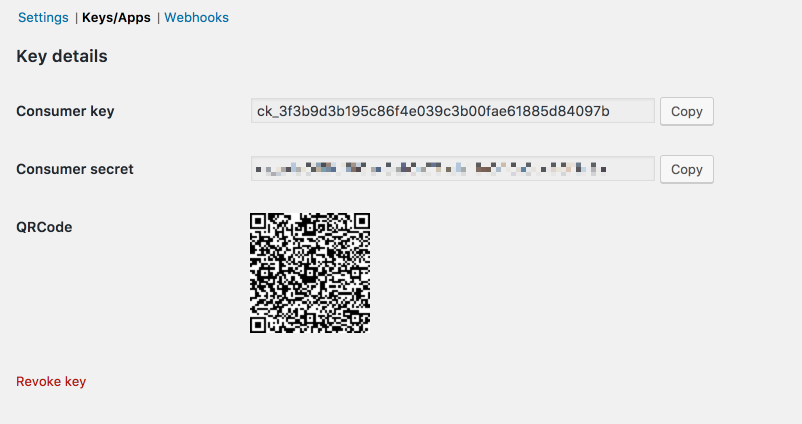
- 您的密钥将显示 - 请不要关闭此标签,再次查看密钥时,secret 将被隐藏。
发送基本请求
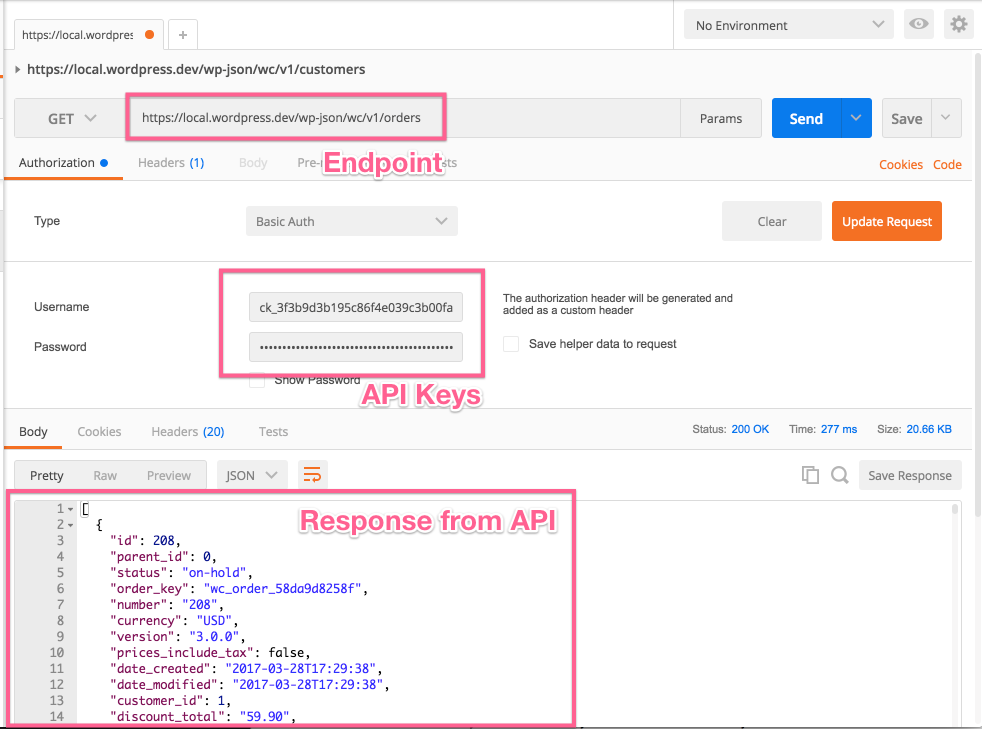
我们将要测试的请求网址是 wp-json/wc/v3/orders。在本地环境中,完整的网址可能如下所示:https://localhost:8888/wp-json/wc/v3/orders。请修改此网址以使用您自己的站点网址。
在 Postman 中,您需要设置请求类型、请求网址以及身份验证选项卡上的设置。对于身份验证,选择 basic auth 并输入您的 WooCommerce 中的 consumer key 和 consumer secret 密钥,分别填入用户名和密码字段。
完成后,点击发送,如果一切顺利,您将看到来自 API 的 JSON 响应:
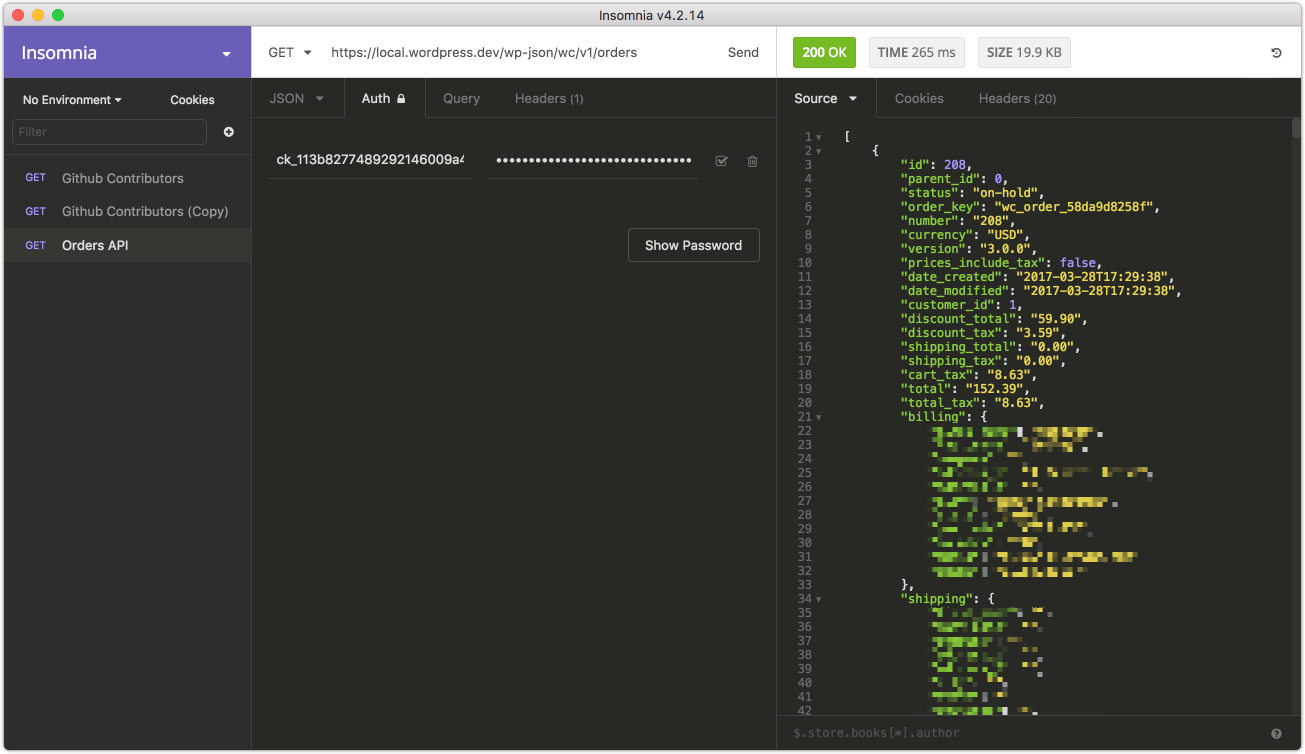
Insomnia 与 Postman 几乎相同;填写相同的字段,再次使用 basic auth:
请求/回复格式
默认的回复格式是 JSON。带有消息体的请求使用纯 JSON 来设置或更新资源属性。成功的请求将返回 200 OK HTTP 状态。
关于回复的一些一般信息:
- 日期以 ISO8601 格式返回:
YYYY-MM-DDTHH:MM:SS - 资源 ID 以整数形式返回
- 任何十进制货币金额,例如价格或总额,将以带有两位小数的字符串形式返回
- 其他数量,例如项目计数,以整数形式返回
- 通常,空白字段会包含
null或空字符串,而不是省略。
JSONP 支持
WP REST API 默认支持 JSONP。JSONP 回复使用 application/javascript 内容类型。您可以使用 ?_jsonp 参数来指定回调函数,该参数用于 GET 请求,以便将回复封装在 JSON 函数中:
GET /wp-json/wc/v3?_jsonp=callback
参数
几乎所有接口都接受可选参数,这些参数可以作为 HTTP 查询字符串参数传递,例如 GET /orders?status=completed。 所有参数都会在每个接口的文档中进行说明。
分页
返回多个项目的请求默认情况下会分页显示,每页显示 10 个项目。 站点管理员可以通过修改 posts_per_page 选项来更改此默认值。 或者,可以使用 ?per_page 参数指定每页的项目数:
GET /orders?per_page=15
您可以使用 ?page 参数来指定其他网页:
GET /orders?page=2
您还可以使用 ?offset 参数来指定相对于第一个资源的偏移量:
GET /orders?offset=5
页码从 1 开始计数,省略 ?page 参数将返回首个页面。
总的资源数量和网页数量始终包含在 X-WP-Total 和 X-WP-TotalPages HTTP 页眉中。
链接页眉
分页信息包含在 链接页眉 中。建议您尽可能遵循这些数值,而不是自行构建网址。
Link: <https://www.example.com/wp-json/wc/v3/products?page=2>; rel="next",
<https://www.example.com/wp-json/wc/v3/products?page=3>; rel="last"
| Value | Description |
|---|---|
next | Shows the URL of the immediate next page of results. |
last | Shows the URL of the last page of results. |
first | Shows the URL of the first page of results. |
prev | Shows the URL of the immediate previous page of results. |
Errors
Occasionally you might encounter errors when accessing the REST API. There are four possible types:
| Error Code | Error Type |
|---|---|
400 Bad Request | Invalid request, e.g. using an unsupported HTTP method |
401 Unauthorized | Authentication or permission error, e.g. incorrect API keys |
404 Not Found | Requests to resources that don't exist or are missing |
500 Internal Server Error | Server error |
Errors return both an appropriate HTTP status code and response object which contains a code, message and data attribute:
{
  "code": "woocommerce_rest_term_invalid",
  "message": "Resource doesn't exist.",
  "data": {
    "status": 404
  }
}
常见的连接问题
本地主机和自签名 SSL 证书的连接问题
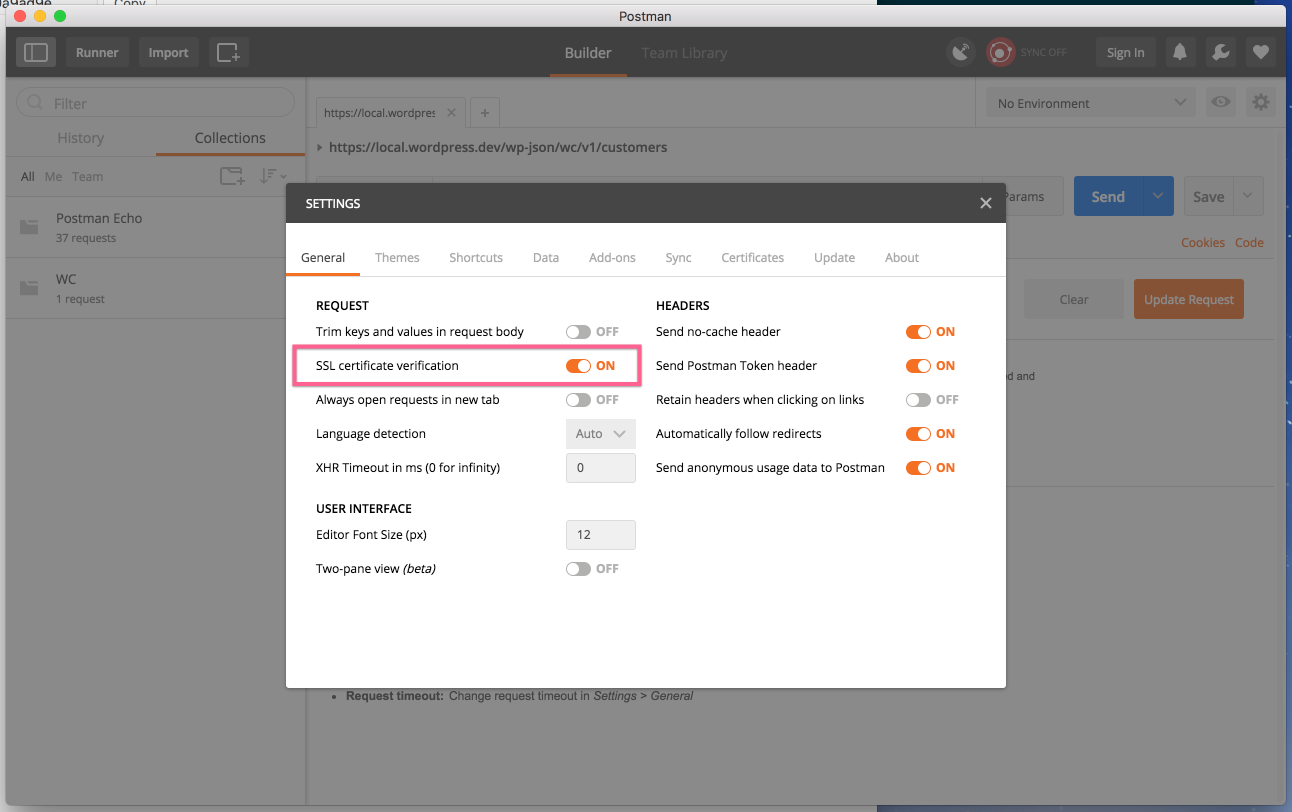
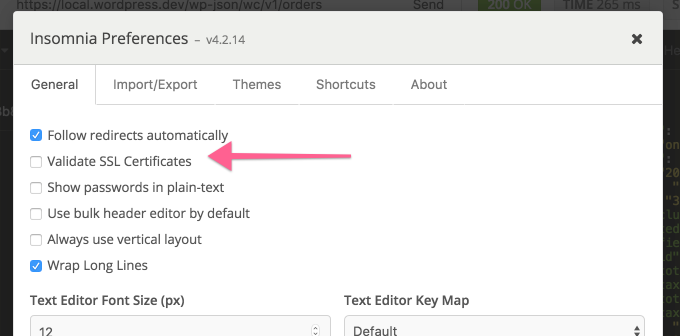
如果您在使用本地主机的 REST API 时遇到连接问题并看到 SSL 错误,则需要禁用 SSL 验证。
在 Postman 中,您可以在设置中找到此选项:
Insomnia 也有类似的设置,位于偏好设置区域:
401 未授权
您的 API 密钥或签名不正确。请确保:
- 您为生成的 API 密钥的用户实际上具有访问这些资源的权限
- 进行身份验证时,用户名应为您的 consumer key
- 进行身份验证时,密码应为您的 consumer secret
- 生成一组新的密钥以确保问题解决
如果您的服务器使用 FastCGI,请检查您的 授权头是否被正确读取。
Consumer key 缺失
有时,服务器可能无法正确解析 Authorization 头(如果在通过 SSL 进行身份验证时看到“Consumer key is missing”错误,则表示存在服务器问题)。
在这种情况下,您可以将 consumer key/secret 作为查询字符串参数提供:
https://local.wordpress.dev/wp-json/wc/v2/orders?consumer_key=XXXX&consumer_secret=XXXX
服务器不支持 POST/DELETE/PUT
理想情况下,您的服务器应该配置为接受这些类型的 API 请求,但如果未配置,您可以使用 _method 属性。
API 版本历史
| API 版本 | WC 版本 | WP 版本 |
|---|---|---|
v3 | 3.5.x 或更高版本 | 4.4 或更高版本 |
v2 | 3.0.x 或更高版本 | 4.4 或更高版本 |
v1 | 2.6.x 或更高版本 | 4.4 或更高版本 |
了解更多
有关 REST API 的更多信息,请查阅 官方 WordPress REST API 文档。