title: "theme.json" post_status: publish comment_status: open taxonomy: category: - gutenberg-docs post_tag: - Curating The Editor Experience - How To Guides - Repos
theme.json
A theme's theme.json file is one of the best ways to curate the Editor experience and will likely be the first tool you use before reaching for more sophisticated solutions.
Providing default controls/options
Since theme.json acts as a configuration tool, there are numerous ways to define at a granular level what options are available. This section will use duotone as an example since it showcases a feature that cuts across a few blocks and allows for varying levels of access.
Duotone with Core options and customization available for each image related block:
{
    "version": 3,
    "settings": {
        "color": {
            "customDuotone": true,
            "duotone": [
            ]
        }
    }
}
Duotone with theme defined color options, Core options, and customization available for each image related block:
{
    "version": 3,
    "settings": {
        "color": {
            "duotone": [
                {
                    "colors": [ "#000000", "#ffffff" ],
                    "slug": "foreground-and-background",
                    "name": "Foreground and background"
                },
                {
                    "colors": [ "#000000", "#ff0200" ],
                    "slug": "foreground-and-secondary",
                    "name": "Foreground and secondary"
                },
                {
                    "colors": [ "#000000", "#7f5dee" ],
                    "slug": "foreground-and-tertiary",
                    "name": "Foreground and tertiary"
                },
            ]
        }
    }
}
Duotone with defined default options and all customization available for the Post Featured Image block:
{
    "version": 3,
    "settings": {
        "color": {
            "custom": true,
            "customDuotone": true
        },
        "blocks": {
            "core/post-featured-image": {
                "color": {
                    "duotone": [
                        {
                            "colors": [ "#282828", "#ff5837" ],
                            "slug": "black-and-orange",
                            "name": "Black and Orange"
                        },
                        {
                            "colors": [ "#282828", "#0288d1" ],
                            "slug": "black-and-blue",
                            "name": "Black and Blue"
                        }
                    ],
                    "customDuotone": true,
                    "custom": true
                }
            }
        }
    }
}
Duotone with only defined default options and core options available for the Post Featured Image block (no customization):
{
    "version": 3,
    "settings": {
        "color": {
            "custom": true,
            "customDuotone": true
        },
        "blocks": {
            "core/post-featured-image": {
                "color": {
                    "duotone": [
                        {
                            "colors": [ "#282828", "#ff5837" ],
                            "slug": "black-and-orange",
                            "name": "Black and Orange"
                        },
                        {
                            "colors": [ "#282828", "#0288d1" ],
                            "slug": "black-and-blue",
                            "name": "Black and Blue"
                        }
                    ],
                    "customDuotone": false,
                    "custom": false
                }
            }
        }
    }
}
通过 theme.json 限制界面选项
按区块限制选项
除了定义默认值外,使用 theme.json 还可以让你完全移除某些选项,转而依赖主题已设置的内容。下图展示了同一段落块的两种极端情况:
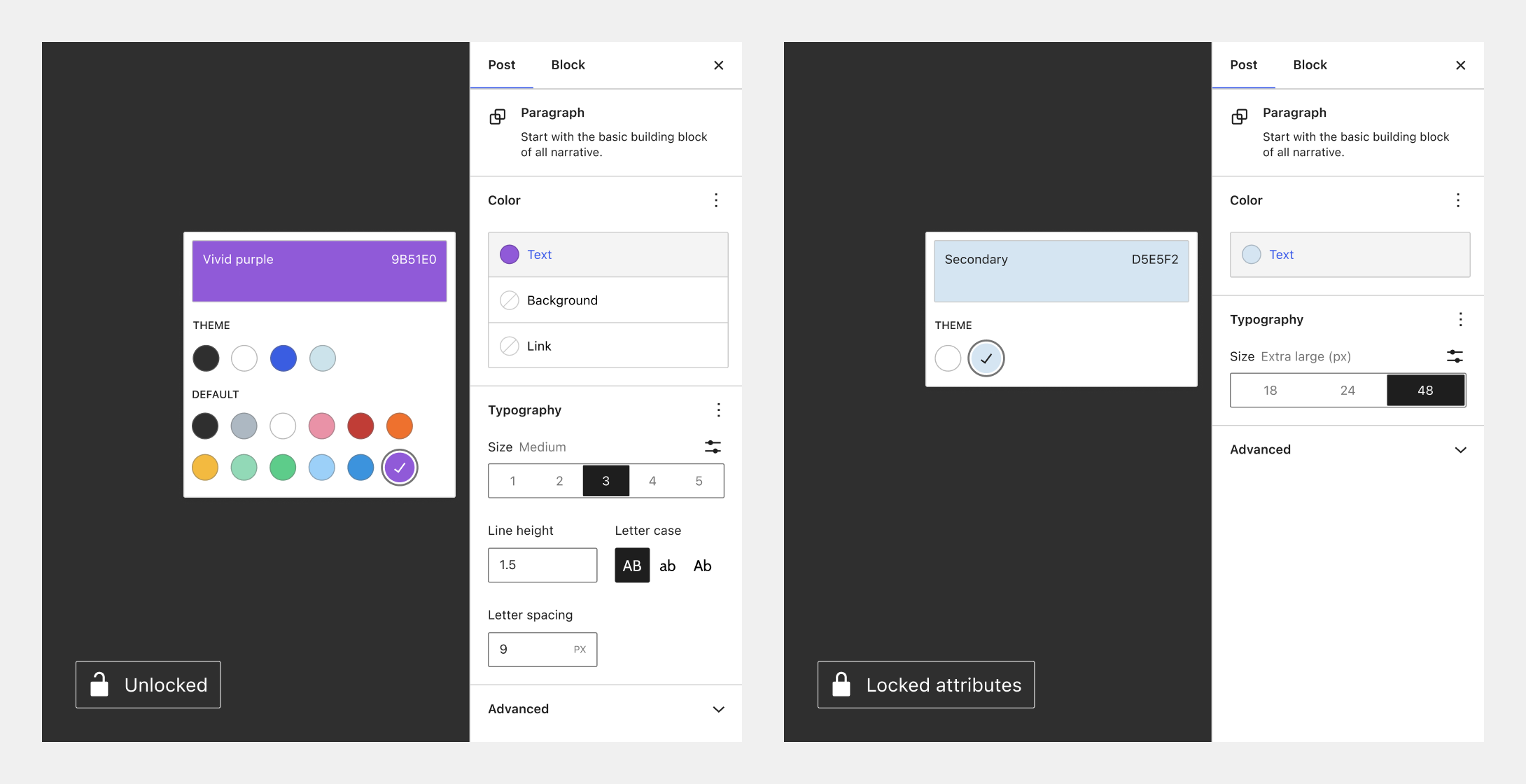
继续以双色调为例,这意味着你可以允许图像块完全访问所有双色调功能,而仅限制文章特色图像块,如下所示:
{
    "version": 3,
    "settings": {
        "color": {
            "custom": true,
            "customDuotone": true
        },
        "blocks": {
            "core/image": {
                "color": {
                    "duotone": [],
                    "customDuotone": true,
                    "custom": true
                }
            },
            "core/post-featured-image": {
                "color": {
                    "duotone": [],
                    "customDuotone": false,
                    "custom": false
                }
            }
        }
    }
}
你可以在此处阅读更多关于如何通过 theme.json 最佳地开启/关闭选项。
禁用继承默认布局
要禁用容器块(如群组块)的“继承默认布局”设置,请移除以下部分:
"layout": {
    "contentSize": null,
    "wideSize": null
},
全局限制选项
在区块主题或经典主题中使用 theme.json 时,以下设置将阻止默认的颜色和排版控件在全局范围内启用,从而极大地限制可用功能:
{
    "version": 3,
    "settings": {
        "layout": {
            "contentSize": "750px"
        },
        "color": {
            "background": false,
            "custom": false,
            "customDuotone": false,
            "customGradient": false,
            "defaultGradients": false,
            "defaultPalette": false,
            "text": false
        },
        "typography": {
            "customFontSize": false,
            "dropCap": false,
            "fontStyle": false,
            "fontWeight": false,
            "letterSpacing": false,
            "lineHeight": false,
            "textDecoration": false,
            "textTransform": false
        }
    }
}
若要启用上述某项功能,只需将你想要更改的值设置为 true 即可实现更精细的控制。