title: "jQuery" post_status: publish comment_status: open taxonomy: category: - developer-plugins-handbook post_tag: - Jquery - Javascript - Repos
jQuery
使用 jQuery
当用户浏览器接收到您的 WordPress 网页后,jQuery 脚本便开始运行。一个基本的 jQuery 语句包含两部分:选择器(决定代码应用于哪些 HTML 元素)和动作或事件(决定代码执行什么操作或响应什么)。基本的事件语句如下所示:
jQuery.(selector).event(function);
当选择器选中的 HTML 元素中发生事件(例如鼠标点击)时,最后一组括号内定义的函数将被执行。
以下所有代码示例均基于此 HTML 页面内容。假设它出现在您插件的管理设置屏幕上,由文件 myplugin_settings.php 定义。这是一个简单的表格,每个标题旁边都有单选按钮。
<form id="radioform">
  <table>
    <tbody>
    <tr>
      <td><input class="pref" checked="checked" name="book" type="radio" value="Sycamore Row" />Sycamore Row</td>
      <td>John Grisham</td>
    </tr>
    <tr>
      <td><input class="pref" name="book" type="radio" value="Dark Witch" />Dark Witch</td>
      <td>Nora Roberts</td>
    </tr>
    </tbody>
  </table>
</form>
在您的设置页面上,输出可能类似这样。
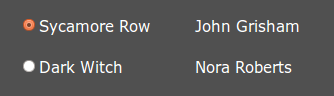
在 AJAX 文章中,我们将构建一个 AJAX 交互,将用户选择保存在用户元数据中,并添加带有选定标题标签的文章数量。这不是一个非常实用的应用,但它说明了所有重要步骤。jQuery 代码可以驻留在外部文件中,也可以输出到页面内的 <script> 块中。我们将重点讨论外部文件变体,因为从 PHP 传递值需要特别注意。如果您认为更便捷,相同的代码也可以输出到页面中。
Selector and Event
The selector is the same form as CSS selectors: .class or #id. There's many more forms, but these are the two you will frequently use. In our example, we will use class .pref. There's also a slew of possible events, one you will likely use a lot is ‘click'. In our example we will use ‘change' to capture a radio button selection. Be aware that jQuery events are often named somewhat differently than those with JavaScript. So far, after we add in an empty anonymous function, our example statement looks like this:
$.(".pref").change(function(){
  /*do stuff*/
});
This code will "do stuff" when any element of the "pref" class changes.
[info]This code snippet, and all examples on this page, are for illustrating the use of AJAX. The code is not suitable for production environments because related operations such as sanitization, security, error handling, and internationalization have been intentionally omitted. Be sure to always address these important operations in your production code.[/info]